HADOOP 的安全性

背景

当Hadoop在2004年开始开发的时候,对如何创建一个安全的分布式计算式环境上没有考虑,Hadoop框架对用户及服务的验证和授权严重不足,用户可以仿冒任意一个HDFS和mapreduce上的用户,恶意的代码可以以任何一个用户提交到Job tracker,尽管在版本0.16以后, HDFS增加了文件和目录的权限,但由于用户无需认证,HDFS的权限控制也极其容易绕过,允许一个用户伪装成任意一个用户,同时计算框架也没有进行双向验证,一个恶意的网络用户可以模拟一个正常的集群服务加入到hadoop集群,去接受JobTracker, Namenode的任务指派。

此时HADOOP要安全只能靠严格的的网络隔离,能访问hadoop集群的用户都是完全可信赖的用户。

到了2009年,关于hadoop安全性的讨论已经接近白热化了,安全被作为一个高优先级的问题摆了出来,Hadoop 2010年的开发计划就包含的用户与服务的双向认证,并且对终端用户透明。具体可参见【HADOOP-4487 Security features for Hadoop7】

安全设计时有以下6大目标:

1.2 Requirements

1. Users are only allowed to access HDFS files that they have permission to access.

2. Users are only allowed to access or modify their own MapReduce jobs.

3. User to service mutual authentication to prevent unauthorized NameNodes, DataNodes, JobTrackers, or TaskTrackers.

4. Service to service mutual authentication to prevent unauthorized services from joining a cluster’s HDFS or MapReduce service.

5. The acquisition and use of Kerberos credentials will be transparent to the user and applications, provided that the operating system acquired a Kerberos Ticket Granting Tickets (TGT) for the user at login.

6. The degradation of GridMix performance should be no more than 3%.

为了达到这目标,开发者决定使用kerberos进行认证。选择kerberos而非SSL基于以下理由:

1. kerberos使用对称密钥可以达到更高的性能,比使用公钥的SSL更快。

2. 简化了用户管理。例如,取消一个用户只需要简单的将用户从KDC里面删除即可,而如果使用SSL就需要生成证书注销列表(CRL) 并分发到所有服务器。

Hadoop的安全设计有以下七大假设

1.For backwards compatibility and single-user clusters, it will be possible to configure the cluster with the current style of security.

2. Hadoop itself does not issue user credentials or create accounts for users. Hadoop depends on external user credentials (e.g. OS login, Kerberos credentials, etc). Users are expected to acquire those credentials from Kerberos at operating system login. Hadoop services should also be configured with suitable credentials depending on the cluster setup to authenticate with each other.

3. Each cluster is set up and configured independently. To access multiple clusters, a client needs to authenticate to each cluster separately. However, a single sign on that acquires a Kerberos ticket will work on all appropriate clusters.

4. Users will not have access to root accounts on the cluster or on the machines that are used to launch jobs.

5. HDFS and MapReduce communication will not travel on untrusted networks.

6. A Hadoop job will run no longer than 7 days (configurable) on a MapReduce cluster or accessing HDFS from the job will fail.

7. Kerberos tickets will not be stored in MapReduce jobs and will not be available to the job’s tasks. Access to HDFS will be authorized via delegation tokens as explained in section 4.1.

以上七个假设基本就是Hadoop安全设计的七大安全缺陷。了解以后也就可以更有针对的对安全问题进行防范。

为了保证开发进度以及保证向后兼容,开发者在设计过程中对安全设计进行了部分妥协,首先新的设计要求终端用户不能在集群中的任何机器上拥有高权限的管理帐户,例如root。如果终端用户对集群中的机器拥有root权限,他就可以发现 Delegation Tokens, Job Tokens, Block Access Tokens或者symmetric encryption keys ,进而颠覆整个系统的安全保证。同时在开发过程中决定保证安全的新功能对于集群性能的影响不大于3%,这导致的开发者倾向使用对称加密算法,并且对网络传输不加密。

 部署hadoop kerberos方案后的安全顾虑

在hadoop新的安全设计中使用的 “threat model” 引起了一些新的安全性上的考虑。首先是SASL (Simple Authenticationand Security Layer)默认提供的安全保护,广泛分发的对称密钥。二是因为强调性能以及加密耗费资源的前提假设,hadoop使用了非常低的默认SASL  QoP (Quality of Protection),尽管SASL over kerberos其实可以做到更好。但hadoop的默认QoP只是进行认证,对于网络通信的完整性以及加密功能并未提供。Hadoop的PRC通信就可以被窃听及修改。同时新的Hadoop 安全设计依赖于HMAC-SHA1 这个对称密钥加密算法。因为Block Access Token 需要,HMAC-SHA1的对称密钥需要分发到Namenode以及所有的datanode机器,这意味着成百上千台的服务器。如果密钥被攻击者发现那么所有datanode上的数据都极其容易受到攻击。只要知道DATAID,攻击者就可以仿冒一个Block Access Token ,进而将hadoop的安全行降低到上一个版本的水平。而且HDFS Proxy使用的是基于IP的认证。一旦获得了HDFS Proxy Server的访问权,就可以读取HDFS Proxy Server 所被授权的所有数据。

二.CDH 4 mrv1 与kerberos集成

测试使用版本如下:

kerberos server 版本:krb5-server-1.9-33.el6.x86_64

Hadoop 版本: CDH4 W/ MRV1

操作系统版本:Redhat Enterprise Linux 6 update 3 64bit

JAVA版本:jdk-6u35-linux-x64


服务器名 IP 用途
rhel227.hadoop.hylandtec.com 172.16.130.227 Kerberos 服务器
rhel63.hadoop.hylandtec.com 172.16.130.234 Hadoop服务器

两台服务器均已经在DNS server上配置好正向及反向解析。hadoop.hylandtec.com 指向kerberos服务器。

安装kerberos服务器

作为测试,仅使用kerberos作为认证服务器,安装系统盘中的krb5-server-1.9-33.el6.x86_64.rpm,krb5-libs-1.9-33.el6.x86_64, krb5-workstation-1.9-33.el6.x86_64

kerberos realm 我们规划为HADOOP.HYLANDTEC.COM,以下配置中注意realm 必须为大写!

编辑/etc/krb5.conf

[logging]

default = FILE:/var/log/krb5libs.log

kdc = FILE:/var/log/krb5kdc.log

admin_server = FILE:/var/log/kadmind.log

[libdefaults]

default_realm = HADOOP.HYLANDTEC.COM

dns_lookup_realm = false

dns_lookup_kdc = false

ticket_lifetime = 24h

renew_lifetime = 7d

forwardable = true

[realms]

HADOOP.HYLANDTEC.COM = {

kdc = rhel227.hadoop.hylandtec.com:88

admin_server = rhel227.hadoop.hylandtec.com:749

default_domain = HADOOP.HYLANDTEC.COM  }

[domain_realm]

.hadoop.hylandtec.com = HADOOP.HYLANDTEC.COM

hadoop.hylandtec.com = HADOOP.HYLANDTEC.COM

[kdc]

profile = /var/kerberos/krb5kdc/kdc.conf

以root用户执行,按照提数输入master key:

 kdb5_util create -s

编辑/var/kerberos/krb5kdc/kdc.conf 文件。设置如下:

[kdcdefaults]

kdc_ports = 88

kdc_tcp_ports = 88

[realms]

HADOOP.HYLANDTEC.COM = {

#master_key_type = aes256-cts

max_renewable_life = 7d

max_life = 2d 0h 0m 0s

default_principal_flags = +renewable

krbMaxTicketLife = 172800

krbMaxRenewableAge = 604800

acl_file = /var/kerberos/krb5kdc/kadm5.acl

dict_file = /usr/share/dict/words

admin_keytab = /var/kerberos/krb5kdc/kadm5.keytab

supported_enctypes =  aes128-cts:normal des3-hmac-sha1:normal arcfour-hmac:normal des-hmac-sha1:normal des-cbc-md5:normal des-cbc-crc:normal

}

编辑/var/kerberos/krb5kdc/kadm5.acl 文件,配置如下:

*/[email protected]    *

执行以下命令,新增root用户

kadmin.local  -q “addprinc root/[email protected]

配置完成后执行以下命令启动kerberos服务:

service krb5kdc start

service kadmin start

经配置好的/etc/krb5.conf 文件分发至hadoop各台机器即可。kerberos服务器安装完成。


HADOOP kerberos 配置

按照官方文档配置即可,没有问题。

https://ccp.cloudera.com/display/CDH4DOC/Configuring+Hadoop+Security+in+CDH4

有时候kerberos出错的提示很不明朗的时候。设置如下环境变量很有帮助:

export HADOOP_OPTS=”-Dsun.security.krb5.debug=true”

参考资料:

【1】 Hadoop Securit Design  

【2】Hadoop Security Design Just Add Kerberos? Really?

【3】Hadoop Security Overview

【4】Hadoop Kerberos安全机制介绍

【5】Configuring Hadoop Security in CDH4


RFC 3961

Kerberos ETypes Kerberos加密类型代码


	encryption type                etype      section or comment
      -----------------------------------------------------------------
      des-cbc-crc                        1             6.2.3
      des-cbc-md4                        2             6.2.2
      des-cbc-md5                        3             6.2.1
      [reserved]                         4
      des3-cbc-md5                       5
      [reserved]                         6
      des3-cbc-sha1                      7
      dsaWithSHA1-CmsOID                 9           (pkinit)
      md5WithRSAEncryption-CmsOID       10           (pkinit)
      sha1WithRSAEncryption-CmsOID      11           (pkinit)
      rc2CBC-EnvOID                     12           (pkinit)
      rsaEncryption-EnvOID              13   (pkinit from PKCS#1 v1.5)
      rsaES-OAEP-ENV-OID                14   (pkinit from PKCS#1 v2.0)
      des-ede3-cbc-Env-OID              15           (pkinit)
      des3-cbc-sha1-kd                  16              6.3
      aes128-cts-hmac-sha1-96           17          [KRB5-AES]
      aes256-cts-hmac-sha1-96           18          [KRB5-AES]
      rc4-hmac                          23          (Microsoft)
      rc4-hmac-exp                      24          (Microsoft)
      subkey-keymaterial                65     (opaque; PacketCable)


Redhat Enterprise Linux 6 update 3 (RHEL 6.3) 与WINDOWS SERVER 2008 Active Directory 集成

好久没用Windows,这周在做hadoop的安全认证相关事情,打算hadoop改用kerberos进行用户认证。kerberos的实现在linux下有很多方案了,因为微软的Active Directory在企业中应用还是比较广泛的,就打算装个windows server 做域控制器,来提供LDAP 目录检索和kerberos认证服务。想想对AD还是挺熟悉的,若干年前就搞过了,于是兴致满满的开工了。

周一装好了windows server 2003 ,这就是悲催故事的开始。。。。。配好了AD和DNS,然后有点悲催,折腾了两天具体就不谈了,回头想是AD中的属性名称与linux不同,然后又按照win2008的属性名做映射,能通才怪了。虽然最后没配通,但是对整个AD与linux的相关集成有了更深入了解。

文中用到的一些信息如下:

域控制器 BIDC.BI.HYLANDTEC.COM

域 :BI.HYLANDTEC.COM

用户检索ldap的bind用户名称 :binduser

1.WINDOWS 配置部分

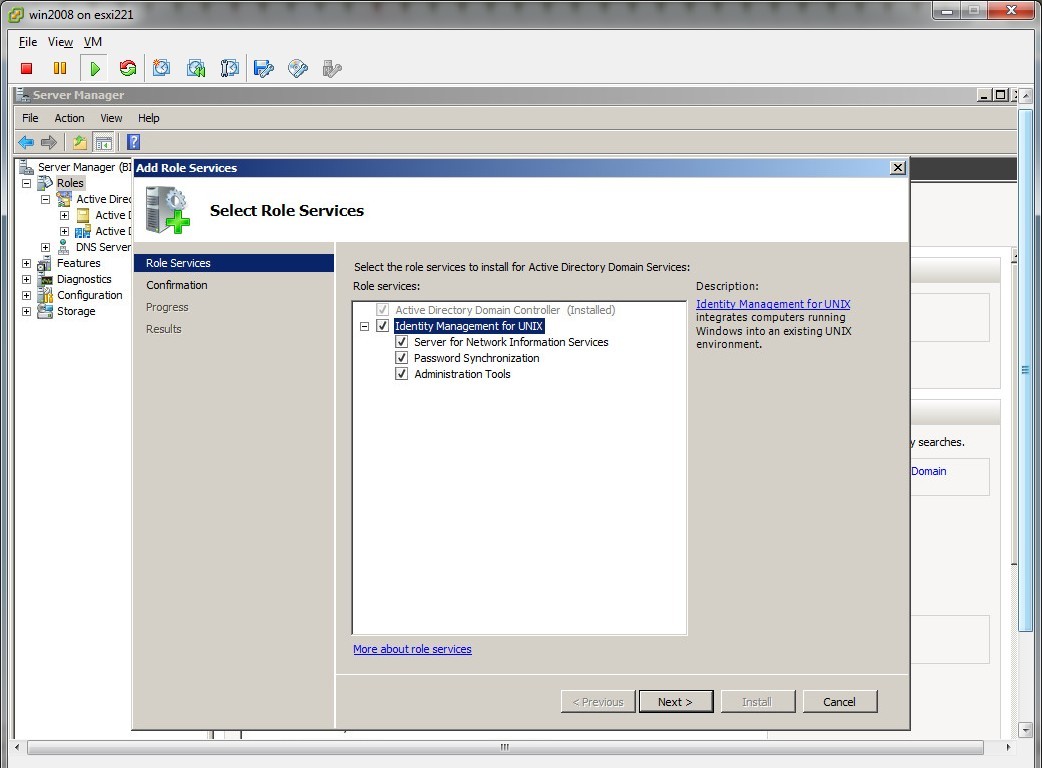
在windows 2008上装完AD以后注意要装上NIS扩展模型,属性中就会出现一个新的Tab页(Unix Attributes) 。设置好uid,gid,homedirectory等AD中的用户和组才能为linux所用。

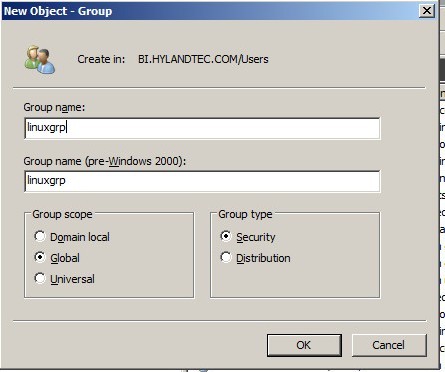
装完NIS以后新增一个group

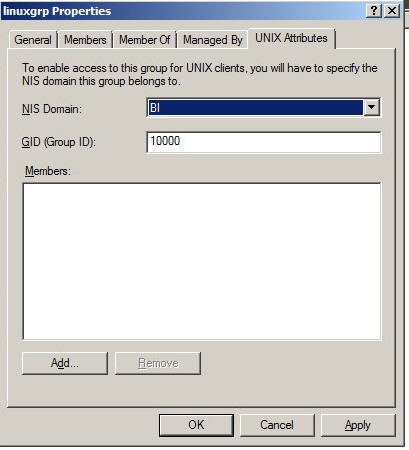
而后设置linuxgrp的gid

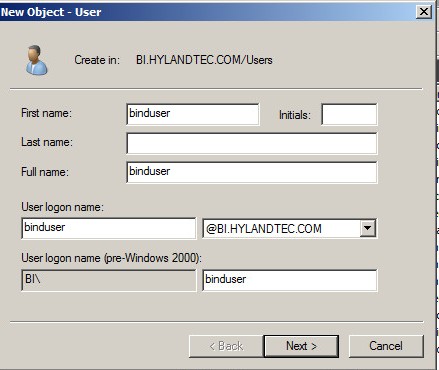
而后新建用户binduser

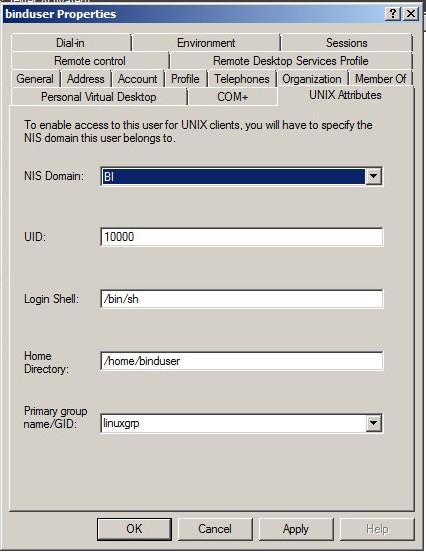
设置好用户的unix相关属性

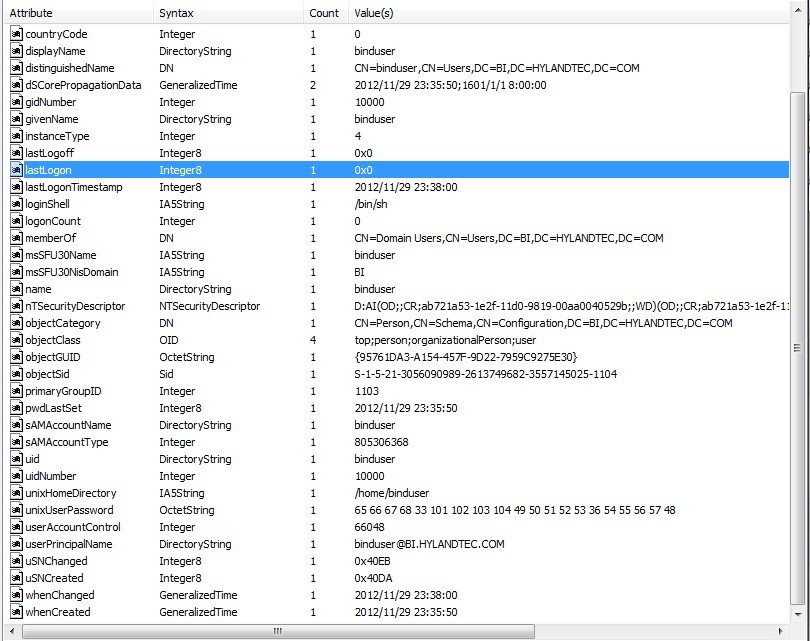
设置完以后用系统自带的ADSI EDIT (ADSIEDIT.MSC) 或者Mark Russinovich 的Active Directory Explorer或者ldapsearch等等来看看用户属性。下图是Active Directory Explorer的截图,如果需要完成属性最好还是用adsiedit来看:

Linux中用户所必需的loginshell,uid,gid等等已经出现了。AD中的配置肩搭到这边即可用了,剩下主要是linux下的工作。

2.linux配置部分

Linux 下有很多方案,用Winbind,sssd.nslcd 的,其中nslcd是rhel 6中引入的,所以本次在rhel6.3中就采用nslcd的方式。


yum install pam_krb5 pam_ldap nss-pam-ldapd nscd openldap-clients

装完以后先执行以下命令试试能否和AD服务器连通,如果服务器不通,检查防火墙和网络设置。

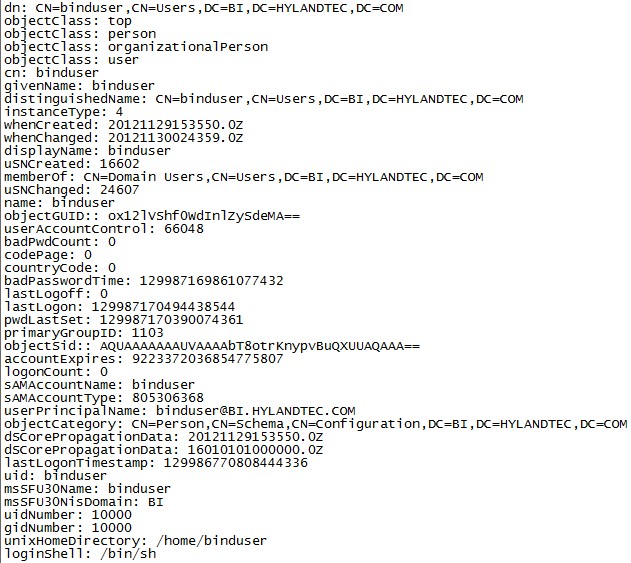
 ldapsearch -x -LLL -H ‘ldap://bidc.bi.hylandtec.com’ -b ‘DC=BI,DC=HYLANDTEC,DC=COM’ -E pr=200/noprompt -D “[email protected]” -W -s sub “(cn=binduser)”

应该会出来类似的结果,注意unix相关属性应该顺利被读取。

与ldap服务器连接无问题后以root用户运行

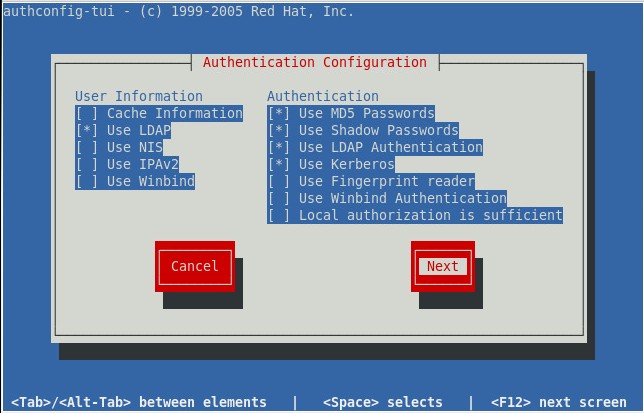
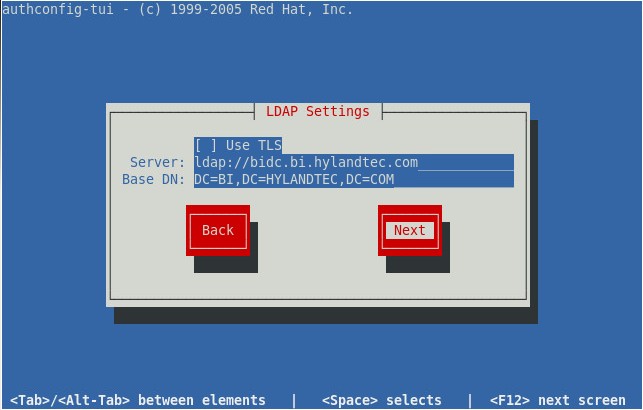
 authconfig-tui

按照如下配置认证方式:

配置LDAP

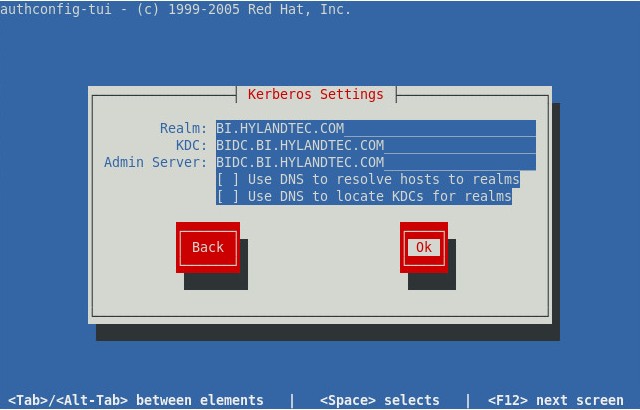
配置kerberos

按OK保存以后会提示nslcd服务启动:

检查Name Service Switch 已经配置为使用ldap了。/etc/nsswitch.conf 文件中以下三行是否有ldap。

passwd:     files ldap

shadow:     files ldap

group:      files ldap

由于AD不允许匿名使用目录服务,以及需要对AD中的属性映射到unix下的属性。还需要对nslcd做手工配置。

修改/etc/nslcd.conf 文件 (注:windows server 2003 装SFU 的NIS 以后的ladp的属性名称和2008的不一样,配置文件中的需要写较多的map 但其实也是可以用的)

binddn CN=binduser,CN=Users,DC=BI,DC=HYLANDTEC,DC=COM

bindpw bind..321

# Mappings for Active Directory

pagesize 1000

referrals off filter

passwd (&(objectClass=user)(!(objectClass=computer))(uidNumber=*)(unixHomeDirectory=*))

map    passwd uid              sAMAccountName

map    passwd homeDirectory    unixHomeDirectory

map    passwd gecos            displayName

filter shadow (&(objectClass=user)(!(objectClass=computer))(uidNumber=*)(unixHomeDirectory=*))

map    shadow uid              sAMAccountName

map    shadow shadowLastChange pwdLastSet

filter group  (objectClass=group)

map    group  uniqueMember     member

修改完后执行/etc/init.d/nslcd restart 重启nslcd

重启完毕后执行getent passwd ,

nscd:x:28:28:NSCD Daemon:/:/sbin/nologin

nslcd:x:65:55:LDAP Client User:/:/sbin/nologin

binduser:*:10000:10000:binduser:/home/binduser:/bin/sh

出现AD中的用户,如binduser就说明nslcd配置正确。

因为LDAP过来的用户并没有创建主目录,所以需要自动新建主目录。在/etc/pam.d/sshd 以及/etc/pam.d/logon中增加一行

session required pam_mkhomedir.so skel=/etc/skel umask=0022

kerberos要求各台服务器间时间同步,误差不能大于十分钟,所以与域控制器做好时间同步。

ntpdate bidc.bi.hylandtec.com

最后检查主机名是否设置正确/etc/hosts

172.16.130.227 rhel227.bi.hylandtec.com rhel227

执行hostname命令设置主机名 ,并检查/etc/sysconfig/network 文件中的主机名是否正确设置。

hostname rhel227.bi.hylandtec.com


编辑, /etc/krb5.conf在libdefaults部分 增加default_tgs_enctypes,default_tkt_enctypes,permitted_enctypes 三个属性,例如:

[libdefaults]

default_realm = BI.HYLANDTEC.COM

dns_lookup_realm = false

dns_lookup_kdc = false

ticket_lifetime = 24h

renew_lifetime = 7d

forwardable = true

default_tgs_enctypes = rc4-hmac

default_tkt_enctypes = rc4-hmac

permitted_enctypes = rc4-hmac

编辑/etc/samba/smb.conf ,内容如下,workgroup写域的第一部分:

workgroup = BI

server string = Samba Server Version %v

netbios name = RHEL227

security = ads

realm = BI.HYLANDTEC.COM

dedicated keytab file = / etc/krb5.keytab

kerberos method = system keytab

password server = BIDC.BI.HYLANDTEC.COM

使用域管理员用户将计算机加入域

[root@rhel227 ~]# net ads join OSNAME=RHEL OSVer=6 -U Administrator

Enter Administrator’s password:

Using short domain name — BI

Joined ‘RHEL227’ to realm ‘BI.HYLANDTEC.COM’

查看keytab ,顺利出现主机内容就表示配置成功。

[root@rhel227 security]# klist -ke

Keytab name: WRFILE:/etc/krb5.keytab

KVNO Principal —- ————————————————————————–

3 host/[email protected] (des-cbc-crc)

3 host/[email protected] (des-cbc-md5)

3 host/[email protected] (arcfour-hmac)

3 host/[email protected] (des-cbc-crc)

3 host/[email protected] (des-cbc-md5)

3 host/[email protected] (arcfour-hmac)

3 [email protected] (des-cbc-crc)

3 [email protected] (des-cbc-md5)

3 [email protected] (arcfour-hmac)


而后我们就可以尝试使用AD上的用户登录linux主机了。。

[root@rhel232 ~]# ssh [email protected]

[email protected]’s password:

Creating directory ‘/home/binduser’.

-sh-4.1$ hostname

rhel227.bi.hylandtec.com

-sh-4.1$ id binduser

uid=10000(binduser) gid=10000(linuxgrp) groups=10000(linuxgrp)

顺利登录,大功告成。


hadoop 0.20.2 capacity scheduler 配置方法

本文采用的是CDH4+MAPREDUCE 0.20

hadoop中共有6台机作为tasktracker ,每台机配置map和reduce个2个slots

队列名 Capacity Maximum  Capacity
 defaults  10%
 edp  50%  90%
 hive  40%  80%

设置完资源后,设置队列的ACL,必须具有相关权限才能向指定队列中提交任务。

队列名 权限
 defaults 所有用户可提交
 edp xhdeng可提交
 hive root及hive用户可提交

登录jobtracker机器

将/usr/lib/hadoop-0.20-mapreduce/contrib/capacity-scheduler/下的hadoop-capacity-scheduler-2.0.0-mr1-cdh4.0.1.jar 复制到/usr/lib/hadoop/lib/目录下

修改/etc/hadoop/conf 下的mapred-site.xml 在其中新增

<property>
<name>mapred.jobtracker.taskScheduler</name>
<value>org.apache.hadoop.mapred.CapacityTaskScheduler</value>
</property>

<property>
<name>mapred.queue.names</name>
<value>default,edp,hive</value>
</property>

<property>
<name>mapred.acls.enabled</name>
<value>true</value>
<description> Specifies whether ACLs should be checked
for authorization of users for doing various queue and job level operations.
ACLs are disabled by default. If enabled, access control checks are made by
JobTracker and TaskTracker when requests are made by users for queue
operations like submit job to a queue and kill a job in the queue and job
operations like viewing the job-details (See mapreduce.job.acl-view-job)
or for modifying the job (See mapreduce.job.acl-modify-job) using
Map/Reduce APIs, RPCs or via the console and web user interfaces.
</description>
</property>

在/etc/hadoop/conf 下新建capacity-scheduler.xml

<?xml version=”1.0″?>

<!– This is the configuration file for the resource manager in Hadoop. –>
<!– You can configure various scheduling parameters related to queues. –>
<!– The properties for a queue follow a naming convention,such as, –>
<!– mapred.capacity-scheduler.queue.<queue-name>.property-name. –>

<configuration>

<property>
<name>mapred.capacity-scheduler.maximum-system-jobs</name>
<value>6</value>
<description>Maximum number of jobs in the system which can be initialized,
concurrently, by the CapacityScheduler.
</description>
</property>

<property>
<name>mapred.capacity-scheduler.queue.default.capacity</name>
<value>10</value>
<description>Percentage of the number of slots in the cluster that are
to be available for jobs in this queue.
</description>
</property>

<property>
<name>mapred.capacity-scheduler.queue.default.maximum-capacity</name>
<value>-1</value>
<description>
maximum-capacity defines a limit beyond which a queue cannot use the capacity of the cluster.
This provides a means to limit how much excess capacity a queue can use. By default, there is no limit.
The maximum-capacity of a queue can only be greater than or equal to its minimum capacity.
Default value of -1 implies a queue can use complete capacity of the cluster.

This property could be to curtail certain jobs which are long running in nature from occupying more than a
certain percentage of the cluster, which in the absence of pre-emption, could lead to capacity guarantees of
other queues being affected.

One important thing to note is that maximum-capacity is a percentage , so based on the cluster’s capacity
the max capacity would change. So if large no of nodes or racks get added to the cluster , max Capacity in
absolute terms would increase accordingly.
</description>
</property>

<property>
<name>mapred.capacity-scheduler.queue.default.supports-priority</name>
<value>false</value>
<description>If true, priorities of jobs will be taken into
account in scheduling decisions.
</description>
</property>

<property>
<name>mapred.capacity-scheduler.queue.default.minimum-user-limit-percent</name>
<value>100</value>
<description> Each queue enforces a limit on the percentage of resources
allocated to a user at any given time, if there is competition for them.
This user limit can vary between a minimum and maximum value. The former
depends on the number of users who have submitted jobs, and the latter is
set to this property value. For example, suppose the value of this
property is 25. If two users have submitted jobs to a queue, no single
user can use more than 50% of the queue resources. If a third user submits
a job, no single user can use more than 33% of the queue resources. With 4
or more users, no user can use more than 25% of the queue’s resources. A
value of 100 implies no user limits are imposed.
</description>
</property>

<property>
<name>mapred.capacity-scheduler.queue.default.user-limit-factor</name>
<value>1</value>
<description>The multiple of the queue capacity which can be configured to
allow a single user to acquire more slots.
</description>
</property>

<property>
<name>mapred.capacity-scheduler.queue.default.maximum-initialized-active-tasks</name>
<value>200000</value>
<description>The maximum number of tasks, across all jobs in the queue,
which can be initialized concurrently. Once the queue’s jobs exceed this
limit they will be queued on disk.
</description>
</property>

<property>
<name>mapred.capacity-scheduler.queue.default.maximum-initialized-active-tasks-per-user</name>
<value>100000</value>
<description>The maximum number of tasks per-user, across all the of the
user’s jobs in the queue, which can be initialized concurrently. Once the
user’s jobs exceed this limit they will be queued on disk.
</description>
</property>

<property>
<name>mapred.capacity-scheduler.queue.default.init-accept-jobs-factor</name>
<value>10</value>
<description>The multipe of (maximum-system-jobs * queue-capacity) used to
determine the number of jobs which are accepted by the scheduler.
</description>
</property>

<!– The default configuration settings for the capacity task scheduler –>
<!– The default values would be applied to all the queues which don’t have –>
<!– the appropriate property for the particular queue –>
<property>
<name>mapred.capacity-scheduler.default-supports-priority</name>
<value>false</value>
<description>If true, priorities of jobs will be taken into
account in scheduling decisions by default in a job queue.
</description>
</property>

<property>
<name>mapred.capacity-scheduler.default-minimum-user-limit-percent</name>
<value>100</value>
<description>The percentage of the resources limited to a particular user
for the job queue at any given point of time by default.
</description>
</property>
<property>
<name>mapred.capacity-scheduler.default-user-limit-factor</name>
<value>1</value>
<description>The default multiple of queue-capacity which is used to
determine the amount of slots a single user can consume concurrently.
</description>
</property>

<property>
<name>mapred.capacity-scheduler.default-maximum-active-tasks-per-queue</name>
<value>200000</value>
<description>The default maximum number of tasks, across all jobs in the
queue, which can be initialized concurrently. Once the queue’s jobs exceed
this limit they will be queued on disk.
</description>
</property>

<property>
<name>mapred.capacity-scheduler.default-maximum-active-tasks-per-user</name>
<value>100000</value>
<description>The default maximum number of tasks per-user, across all the of
the user’s jobs in the queue, which can be initialized concurrently. Once
the user’s jobs exceed this limit they will be queued on disk.
</description>
</property>

<property>
<name>mapred.capacity-scheduler.default-init-accept-jobs-factor</name>
<value>10</value>
<description>The default multipe of (maximum-system-jobs * queue-capacity)
used to determine the number of jobs which are accepted by the scheduler.
</description>
</property>

<!– Capacity scheduler Job Initialization configuration parameters –>
<property>
<name>mapred.capacity-scheduler.init-poll-interval</name>
<value>5000</value>
<description>The amount of time in miliseconds which is used to poll
the job queues for jobs to initialize.
</description>
</property>
<property>
<name>mapred.capacity-scheduler.init-worker-threads</name>
<value>5</value>
<description>Number of worker threads which would be used by
Initialization poller to initialize jobs in a set of queue.
If number mentioned in property is equal to number of job queues
then a single thread would initialize jobs in a queue. If lesser
then a thread would get a set of queues assigned. If the number
is greater then number of threads would be equal to number of
job queues.
</description>
</property>

<property>
<name>mapred.capacity-scheduler.queue.hive.capacity</name>
<value>40</value>
</property>
<property>
<name>mapred.capacity-scheduler.queue.hive.maximum-capacity</name>
<value>80</value>
</property>
<property>
<name>mapred.capacity-scheduler.queue.hive.supports-priority</name>
<value>false</value>
</property>
<property>
<name>mapred.capacity-scheduler.queue.hive.minimum-user-limit-percent</name>
<value>20</value>
</property>
<property>
<name>mapred.capacity-scheduler.queue.hive.user-limit-factor</name>
<value>10</value>
</property>
<property>
<name>mapred.capacity-scheduler.queue.hive.maximum-initialized-active-tasks</name>
<value>200000</value>
</property>
<property>
<name>mapred.capacity-scheduler.queue.hive.maximum-initialized-active-tasks-per-user</name>
<value>100000</value>
</property>
<property>
<name>mapred.capacity-scheduler.queue.hive.init-accept-jobs-factor</name>
<value>100</value>
</property>

<!– queue: edp –>
<property>
<name>mapred.capacity-scheduler.queue.edp.capacity</name>
<value>50</value>
</property>
<property>
<name>mapred.capacity-scheduler.queue.edp.maximum-capacity</name>
<value>90</value>
</property>
<property>
<name>mapred.capacity-scheduler.queue.edp.supports-priority</name>
<value>false</value>
</property>
<property>
<name>mapred.capacity-scheduler.queue.edp.minimum-user-limit-percent</name>
<value>100</value>
</property>
<property>
<name>mapred.capacity-scheduler.queue.edp.user-limit-factor</name>
<value>1</value>
</property>
<property>
<name>mapred.capacity-scheduler.queue.edp.maximum-initialized-active-tasks</name>
<value>200000</value>
</property>
<property>
<name>mapred.capacity-scheduler.queue.edp.maximum-initialized-active-tasks-per-user</name>
<value>100000</value>
</property>
<property>
<name>mapred.capacity-scheduler.queue.edp.init-accept-jobs-factor</name>
<value>10</value>
</property>

</configuration>

在/etc/hadoop/conf 下新建mapred-queue-acls.xml

<configuration>
<property>
<name>mapred.queue.edp.acl-submit-job</name>
<value>xhdeng</value>
<description> Comma separated list of user and group names that are allowed
to submit jobs to the ‘default’ queue. The user list and the group list
are separated by a blank. For e.g. user1,user2 group1,group2.
If set to the special value ‘*’, it means all users are allowed to
submit jobs. If set to ‘ ‘(i.e. space), no user will be allowed to submit
jobs.

It is only used if authorization is enabled in Map/Reduce by setting the
configuration property mapred.acls.enabled to true.
Irrespective of this ACL configuration, the user who started the cluster and
cluster administrators configured via
mapreduce.cluster.administrators can submit jobs.
</description>
</property>
<property>
<name>mapred.queue.hive.acl-submit-job</name>
<value>hive,root</value>
<description> Comma separated list of user and group names that are allowed
to submit jobs to the ‘default’ queue. The user list and the group list
are separated by a blank. For e.g. user1,user2 group1,group2.
If set to the special value ‘*’, it means all users are allowed to
submit jobs. If set to ‘ ‘(i.e. space), no user will be allowed to submit
jobs.

It is only used if authorization is enabled in Map/Reduce by setting the
configuration property mapred.acls.enabled to true.
Irrespective of this ACL configuration, the user who started the cluster and
cluster administrators configured via
mapreduce.cluster.administrators can submit jobs.
</description>
</property>
<property>
<name>mapred.queue.default.acl-submit-job</name>
<value>*</value>
<description> Comma separated list of user and group names that are allowed
to submit jobs to the ‘default’ queue. The user list and the group list
are separated by a blank. For e.g. user1,user2 group1,group2.
If set to the special value ‘*’, it means all users are allowed to
submit jobs. If set to ‘ ‘(i.e. space), no user will be allowed to submit
jobs.

It is only used if authorization is enabled in Map/Reduce by setting the
configuration property mapred.acls.enabled to true.
Irrespective of this ACL configuration, the user who started the cluster and
cluster administrators configured via
mapreduce.cluster.administrators can submit jobs.
</description>
</property>
</configuration>

重启jobtracker,登录hadoop的map/reduce administration即可发现新的调度器生效。


Scheduling Information

Queue Name State Scheduling Information
hive running Queue configuration
Capacity Percentage: 40.0%
User Limit: 20%
Priority Supported: NO
————-
Map tasks
Capacity: 4 slots
Maximum capacity: 9 slots
Used capacity: 0 (0.0% of Capacity)
Running tasks: 0
————-
Reduce tasks
Capacity: 4 slots
Maximum capacity: 9 slots
Used capacity: 0 (0.0% of Capacity)
Running tasks: 0
————-
Job info
Number of Waiting Jobs: 0
Number of Initializing Jobs: 0
Number of users who have submitted jobs: 0
default running Queue configuration
Capacity Percentage: 10.0%
User Limit: 100%
Priority Supported: NO
————-
Map tasks
Capacity: 1 slots
Used capacity: 0 (0.0% of Capacity)
Running tasks: 0
————-
Reduce tasks
Capacity: 1 slots
Used capacity: 0 (0.0% of Capacity)
Running tasks: 0
————-
Job info
Number of Waiting Jobs: 0
Number of Initializing Jobs: 0
Number of users who have submitted jobs: 0
edp running Queue configuration
Capacity Percentage: 50.0%
User Limit: 100%
Priority Supported: NO
————-
Map tasks
Capacity: 6 slots
Maximum capacity: 10 slots
Used capacity: 0 (0.0% of Capacity)
Running tasks: 0
————-
Reduce tasks
Capacity: 6 slots
Maximum capacity: 10 slots
Used capacity: 0 (0.0% of Capacity)
Running tasks: 0
————-
Job info
Number of Waiting Jobs: 0
Number of Initializing Jobs: 0
Number of users who have submitted jobs: 0


如果修改了调度器的配置文件,无需重启整个jobtracker,使用以下命令刷新即可。

hadoop mradmin -refreshQueues

查看当前用户的acl可以使用以下命令查看。

mapred queue -showacls

Queue acls for user : root

Queue Operations
=====================
hive submit-job,administer-jobs
default submit-job,administer-jobs
edp administer-jobs

用root用户往edp队列中跑一个任务测试一下:

sudo  hadoop jar    hadoop-mapreduce-client-jobclient-2.0.0-cdh4.0.1-tests.jar TestDFSIO -D mapred.job.queue.name=edp  -write -nrFiles 6 -fileSize 1000

然后,必然的,报错了。

12/11/23 16:16:19 ERROR security.UserGroupInformation: PriviledgedActionException as:root (auth:SIMPLE) cause:org.apache.hadoop.security.AccessControlException: User root cannot perform operation SUBMIT_JOB on queue edp.
Please run “hadoop queue -showacls” command to find the queues you have access to .

用root用户往edp用户中跑一个任务测试一下:

sudo  hadoop jar    hadoop-mapreduce-client-jobclient-2.0.0-cdh4.0.1-tests.jar TestDFSIO  -write -nrFiles 6 -fileSize 1000

然后,必然的,报错了。

default running Queue configuration
Capacity Percentage: 10.0%
User Limit: 100%
Priority Supported: NO
————-
Map tasks
Capacity: 1 slots
Used capacity: 1 (100.0% of Capacity)
Running tasks: 1
Active users:
User ‘root’: 1 (100.0% of used capacity)
————-
Reduce tasks
Capacity: 1 slots
Used capacity: 0 (0.0% of Capacity)
Running tasks: 0
————-
Job info
Number of Waiting Jobs: 0
Number of Initializing Jobs: 0
Number of users who have submitted jobs: 1

跑起来了,很悲催的是只能使用1个slot。。。

那往hive队列上再调一次。。


Queue Name State Scheduling Information
hive running Queue configuration
Capacity Percentage: 40.0%
User Limit: 20%
Priority Supported: NO
————-
Map tasks
Capacity: 4 slots
Maximum capacity: 9 slots
Used capacity: 6 (150.0% of Capacity)
Running tasks: 6
Active users:
User ‘root’: 6 (100.0% of used capacity)
————-
Reduce tasks
Capacity: 4 slots
Maximum capacity: 9 slots
Used capacity: 0 (0.0% of Capacity)
Running tasks: 0
————-
Job info
Number of Waiting Jobs: 0
Number of Initializing Jobs: 0
Number of users who have submitted jobs: 1

提示:我们设置的capacity是4,而实际的则是Used capacity: 6 (150.0% of Capacity),符合我们的预期。

使用capacity scheduler ,集群的资源得到有效的管理可控制,即不会让一个用户跑死整个集群,也不会管得过死造成资源闲置。


OpenLDAP 2.3 使用非root用户启动

OpenLDAP默认使用root用户安装及启动,这当然是有原因的,OpenLDAP 的默认安装位置在/usr/local/,非root用户无权安装,而且OpenLDAP的默认端口为389,在linux情况下,低于1024的端口号为特权端口,必须使用root权限才能绑定。

所以要使用非root用户,一个是安装路径要改为非root权限即可读写的目录,二是将端口号改为1024以上的非特权端口。

所以安装过程加上了制定安装路径的步骤,例如安装在ld用户的openldap目录下:

./configure –prefix=/home/ld/openldap

make depend

make

make install

安装完后,进行slapd.conf的配置等等,即可启动服务,例如使用3389端口

/home/ld/openldap/libexec/slapd -f /home/ld/openldap/etc/openldap/slapd.conf -h ldap://localhost:3389

使用netstat检查,3389端口已经在监听中,Openldap安装启动完成。


攻城师的沟通修炼

软件开发做久了,都会有一些角色的转变,从最初的直接leader分配具体工作来做,到后来需要和不同部门一起协作开发,沟通都是必备技能与工具,无论升级为TL(team leader)、PM(project manager),还是继续做软件工程师。最初做研发时,可能更多的只是关注技术性的专业知识上,觉得做好分配给自己的本职工作是唯一目标。当你技术能力提升到一定高度的时候,领导会分配更大的项目让你负责,这时你发现,写代码不再是你8小时的全部内容,你需要和产品经理探讨需求,需要和其他攻城师讨论技术方案,需要和其他部门协调项目进度,需要和测试人员确认测试流程。。。。等等等等,你突然发现,沟通变得越来越重要,它已经成为你完成特定行动唯一真正有效的手段。
这种转型,对很多工程师来说是痛苦的,很多人当初选择做研发是觉得程序开发只面对机器而不是人,正好符合自己不善言辞的木讷内向性格,当自己在这行业学到很多技术,自以为可以松一口气的时候,突然发现自己的性格竟然不适合这个行业了,你是否在有了很多技术经验后有过这样的迷茫?
你是否在和别人沟通需求时这个表情?

你是否也像我曾经一样,在别人说观点时一直在寻找一次讲话的机会?或者干脆马上粗暴的打断别人来表达自己的立场?在产品经理提了一个大的需求改动时马上说这个做不了?在提出技术方案后意识到错误,但为了程序员的自尊以及觉得其他人都不懂技术而不去做道歉不做修改?在测试人员指出某个问题时觉得测试人员太过于较真,觉得这种情况一万年也不会出现而懒得修改?
最近读了一本工程师修炼的书,里面讲了最重要的一条就是沟通。
无论你从程序员升级为TL,还是PM,还是架构师,或者是高级工程师,其实都是一种晋级。沟通技术知识对你往上升是非常关键的技能。这种技能通常意味着维护你的职位,明确特定项目的潜在风险和当前问题。在单位等级结构的这一层上,你应该阻止产生问题、寻找问题并且解决问题。你的上级都在盯着看你的每一步动作。压力往往会非常大。对于靠技术吃饭的人来说,若想迈出跳至管理的第一步,阶梯上的下个台阶的特性已经大大变化了。尤其是,首先要求的技能是沟通范围、数量大大地拓宽了。

一、沟通原则
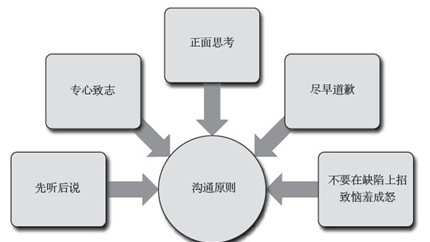
学习有效沟通是一个终身的过程——永远都有改善的余地。要学习的沟通原则包括:先听后说、专心致志(人和心思在一处)、正面思考等,这些原则有助于建立与别人的信任关系,使你成为更高超的沟通者。

1. 先听后说
你有没有发现自己在某次谈话中总是想寻求一次讲话的机会,而没有真正在听别人说什么?当你没有听时,你传递给那个对你讲话的人什么信息呢?
至少表面上,你显得不在乎别人说什么。大部分人会很快厌倦这样的谈话,因为他们说的话白白在空气中传播却没人去听。说话的人也许会想他还有更好的事要做,而结束此次谈话。如果你只是偶尔这样做,这种行为没什么大不了的。如果这是你的习惯做法,那么你是在自己与别人之间构筑一道墙。
你听的时候,是不是在找机会纠正对方?即便谈论的话题在往前走,但是你的思路还停留在刚才的某一点上?
这种情况说明,我们并没有在听别人说什么。讲话的人对你很在乎,从其忙碌的工作中抽出时间,为你提供这些宝贵的信息,所以应该认真去听他说什么。
当有人与你说话时,要看着他说,并试着理解他想沟通的内容。给对方足够的时间来表达他的观点,然后再向其询问要澄清的问题。向他表达非语言的反馈,例如点头,让他知道你在关注这次谈话。
我认为罗马人Epictetus说得好:“我们有两个耳朵,一个嘴巴,所以我们应该多听少说。”
2. 专心致志
不管你在哪里,都应专心致志。生活中有许多事情要分神,例如这个周末你要做什么,几分钟前开会回来如何解决会上的问题,怎样找个办法告诉老板某个负面的消息,小孩今晚的英式足球比赛几点开场……所有这些琐事都很容易让你想入非非。
一般来说,人在任何时刻最多只能同时处理7件±2件那么多的事。如果你的脑袋全是一些无关紧要的琐事,你就无法专心致志地做事。要是有人对你说话,你就会完全听不到他在讲什么。倘若他在问你问题,你可能要他们再说一遍。这种情况下,你其实是在浪费别人的时间,他们不会高兴的。如果房间里有个执行官,你就会给人家留下一个持久的坏印象:真是个浪费钱的家伙!
请你读些时间管理方面的书,列出每天需要关注事情的清单计划。在计划中安排好任务的优先级(当天、本周等),并标识每个任务准备投入的时间。这个办法能够让你通过计划安排好每件事,节省你的精力去记忆周围各种正在发生的事。
如果某个会议不是真的需要你参加,你就不要去;假如确实需要你参加,就一定要去,而且人和心思都花在那里。
我发现,坐直、将脚放在座位正下方、做笔记、直视正在讲话的人,能够自然而然地全神贯注于会议正在进行的事情,从说话和肢体语言两方面都给人以积极参与的正面印象。
不管你做什么,都要专心致志!
3. 正面思考
当你表达信息时,总有许多种方法去传递它们。信息需要真实和准确,然而表现出其意义的方式可以多种多样。
你可以以积极意义或消极意义提供信息。你可以基于所期望的结果选择某种方法。也可以采用不偏不倚的方式,不带情绪地列举事实,尽管这通常很难做到。
从沟通的观点来看,人们容易注意负面的东西。通常负面消息总会带来恐惧(当我感觉恐惧邻近时,我会把它当做“要求集中精力的行动”的信号)。
作为架构师,你需要避免不必要的偏见信息,让别人能够选择他们要关注的信息。你可以提供若干种替代方案,但这些方案应当是客观平等的。你需要察觉可能的办法,而不是为别人留下疑惑。
4. 尽早道歉
在一天的事务中,你可能注意到对他人做的某个事情不合适或不正确。记住放下自尊去给受影响的对方道一个歉。向别人诚心道歉并不是好玩或者容易之举,但你可以赢得别人的尊敬,展示你在尽力成长,尝试变得更好的意图。
如果你道歉,对方就有可能重新审视事情,而原谅你带来的任何苦恼伤痛。有些让人尴尬的事情转而有了积极意义。你与那人的关系就有了增进的机会,而不是就此冷淡。
人的本能倾向就是让冒犯别人后的情势不了了之。遗憾的是,你可能埋下了让它长大成祸患的种子,以致对你造成长期的影响。被得罪的人可能会耿耿于怀,在很长很长时间内记住这件事。那个人也许会把这件事告诉别人,说你是个什么类型的人。你和此人及周围其他人的交往能力可能大打折扣。最后,或许你已经忘记做过的事,但是对方却没有忘记。
道歉时,你要清楚地表达出要道歉的是什么,你说的是什么意思。如果你不是诚心道歉,虚假的说辞可能把事情弄得更糟。如果你不能表达诚意,就不要道歉,但你的目标应当是努力与你所交往的人修缮积极的关系。避免让道歉使你向错误的方向发展,限制你的个人成长。
5. 不要在缺陷上招致恼羞成怒
当你在开评审会(例如产品概念评估、需求评审、设计评审、代码评审、测试评审、产品发布评审)时,通常会检查出评审项目的一些缺陷。评审项目的作者对于这些暴露出的缺陷当然会感到不自在。

二、沟通策略
在我们研究了沟通的核心原则后,现在你可以应用一系列策略来展示恒定、高效的沟通风格。
1,多说“是”,少说“不是”
多想解决方案,解决问题,而不是粗暴的反对。
2,抑制想自卫的冲动
通常在交谈中,当我们听到并不完全对自己有正面意义的事情时,我们可能会找借口,我们可能会找办法转移话题,并责怪他人,以使自己脱离干系。或者我们想强词夺理,以阐述那些语句。应当避免做出此反应的冲动。相反,代之以等待,并接受别人所说的话。
在上一段描述的反应中,会谈的真正兴趣已经从对别人转移到你身上。听别人说话的行为至少暂时结束了,我们开始与会谈者发出警示信号:“我们把话题引向另一个方向吧,一个和我没关系的方向。”注意你正在用的肢体语言—胳膊交叉在胸前,或者头转向一边告诉别人“我不想听了”。
问自己这个问题:我能从这个人说的话中学到什么?”通常,他给出的信息也许并不是你乐意听到的,但其动机是好的,仍是你接受信息并获得个人成长的机会。
抑制想自卫的冲动的一个例外就是当手头的问题涉及企业政策或你的正直时。如果别人说的话使你真正涉及与公司政策冲突或你出于正直未做某事(假如,你已经正确做出了行动)时,你需要立即抨击这些说法。你可能想用澄清问题的办法来明确要点,比如“你的意思是我做过某事吗”。如果别人说“是的”,你就以“这并不准确”来明确回应;倘若人家回答“不是”,要感谢他澄清了此事。

转自:http://tech.weibo.com/?p=2103